
A customer writes on your website at 21:00 to ask when their order will arrive. The next day, your team finds the message, then a missed call, then a follow-up email. Three requests for a single question, and the morning starts late.
Bringing AI into your customer service means answering these recurring questions straight away. Your team stays on the conversations that need an adviser.
This guide draws the line between the two. It then shows how to go about it by phone, on your website chat and on WhatsApp. It draws on our data from October 2025 to September 2026. You will also see how AI customer service works, from the first question to the handover to your team.
How is AI used in customer service?
Using AI in customer service means letting an agent handle the requests that always follow the same path. A frequent question, an order update, an appointment: the answer is known in advance. Your team steps in when the request goes beyond that.
Today, your advisers spend part of their day repeating the same answers. Meanwhile, the requests that need them wait.
Customer service automation covers three very different tools:
| What it does | Its limit | |
|---|---|---|
| Automatic rules | A confirmation email, an out-of-office message, a “press 1” phone menu | They carry out what you planned, without answering a question |
| Button-based chatbot | Fixed choices and answers prepared branch by branch | It gets stuck as soon as the question falls outside the script |
| AI agent | It understands a question written or spoken freely and answers from your documents | It only knows what you give it, and hands over according to your instructions |
These tools work together. An online shop keeps its order confirmation email. It hands questions about delivery times and returns to an AI agent.
Your customers notice the difference quickly. Faced with buttons, they look for the option that resembles their question. Faced with an AI agent, they ask their question in their own words. The answer comes from your terms and conditions.
Which requests can you hand over to AI?
A request is a good fit for AI when its answer already exists in your business and applies to everyone. If it involves a decision, it stays with your team.
| Request | What the customer says | What the AI agent does | Channel |
|---|---|---|---|
| Practical questions | “Are you open on Saturday?” | Answers from your opening hours, prices and terms | Phone, chat; WhatsApp from Pro |
| Order updates | “When will I get my order?” | Gives the lead times and steps written in your documents | Phone, chat; WhatsApp from Pro |
| Appointment booking | “I’d like to come in on Thursday.” | Offers a free slot and books it | From Pro, with your calendar connected |
| First triage | Any new request | Notes the need and contact details, summarises and classifies by topic | All channels |
| Callback request | “Can you call me?” | Notes the number and the time, then Léa calls back | From Pro, through workflows |
Tracking a specific order needs access to your tool. From Pro, the agent can call your software’s API through requests you configure. Without that, it gives the general lead times and passes the request on.
First triage saves your team from calling back to complete a request. The agent asks the questions you planned and fills in the record during the conversation.
of conversations where the agent fills in the useful details itself (need, availability, interest), for a typical customer
Your adviser then opens a request that is already complete. They no longer need to ask the customer again for their order number or availability.
Also think about when requests arrive. On average, 27% of calls received come in outside opening hours. Many are simple questions, yet they wait until the next day.
What should your team keep?
Some requests need listening or a decision. A correct answer isn’t enough: the customer wants a person to take responsibility.
- Complaints and disputes: a damaged parcel, a disputed invoice, a poor service. The customer wants to be heard, then to know what you will do.
- Customers in difficulty: someone who is lost, in a hurry or in a delicate situation. They need someone to take the time.
- Commercial decisions: a goodwill gesture, a discount, an exception to your terms. Your team grants them.
- Requests never seen before: if the answer isn’t in any document, the agent must not make it up.
For an online shop, the line often falls between “Where is my parcel?” and “My parcel arrived broken.” The first question has a written answer. The second needs a person to decide on a replacement or a refund.
The moment of handover matters as much as the line itself. A customer who has to explain everything again leaves annoyed.
“I’ve already explained this to your colleague!”
With an AI agent, every request passed on comes with its transcript, a summary and a classification by topic. On the phone, Léa transfers the call to the extension or number you have chosen. If no one is available, she takes the request. Your adviser picks up the conversation where it stopped, without asking the same questions again.
You write these rules yourself, in plain language: when the agent hands over, and to whom. You change them whenever you like, without waiting for anyone.
- Your customerA customer callsA practical question, an order update or a complaint, in their own words.
- Léa · PhoneLéa answers if it’s written downOpening hours, lead times, terms: the answer comes from your documents.
- Your handover rulesDispute, decision or missing answerLéa transfers the call to the right extension, or takes the request.
- Your teamYour adviser takes over and decidesWith the transcript, the summary and the topic, without asking the questions again.
How does AI customer service work by phone, chat and WhatsApp?
Your customers don’t all choose the same channel. The phone is where a lost request is least visible: it rings, then nothing. So start by looking at where your requests come in.
- Calls received outside opening hours27%
- Website chat conversations outside opening hours44%
On the phone, with Léa
Léa, your AI agent on the phone, picks up when your team can’t. She answers common questions, takes the request or transfers the call. You keep your number: call forwarding is enough, from Starter.
In our data, the AI agent answered 99% of inbound calls on average. Calls in the evening and over lunch get an answer, instead of voicemail. Léa speaks English, French, German, Spanish and Italian. The language is set agent by agent.
On your website chat, with Marc
A customer service chatbot answers visitors while they read your pages. Marc, the chat agent, is installed with a script you paste into your website. He is included from Starter.
for the agent to reply on your website chat, on average
Chat also helps when you are closed. On average, 44% of website conversations take place outside opening hours. A visitor would rather talk to someone? Marc notes their number and, from Pro, Léa calls them back through workflows.
Each conversation arrives in your workspace with a summary, classified by topic, for example: quote request, practical question, complaint. Your team deals with what is urgent first. The details are on our website chatbot page.
On WhatsApp, with Sara
An agency or a small service business often receives WhatsApp messages in the evening. Sara answers them from your documents, from Pro. Your account connects in a few minutes. The fees charged by Meta are not included in the credits.
To message a customer first, you need their consent and a message template approved by Meta. Our guide to the WhatsApp Business API explains these rules.
How to bring AI into your customer service in 5 steps
There is no need to automate everything at once. Start from what you already have: your frequent questions and your documents.
- List your requests. Go back over two weeks of emails, calls and messages. Sort them by frequency, then mark the ones whose answer is always the same.
- Gather your documents. Terms, opening hours, price list, FAQ: you already have the essentials. Drop them into the agent’s knowledge base, as PDF, Word or text files. It is included in every plan.
- Set the transfer rules. Write in its instructions when it hands over, and to whom. Also say what it does when information is missing: it says so, takes the request or transfers.
- Test it before your customers do. Chat with the agent in your workspace before going live. Ask it your trickiest questions, and have an adviser try it.
- Track, then adjust. Each week, read the summaries and the transfer rate shown in your dashboard. A question keeps coming back without an answer? Add the missing document.
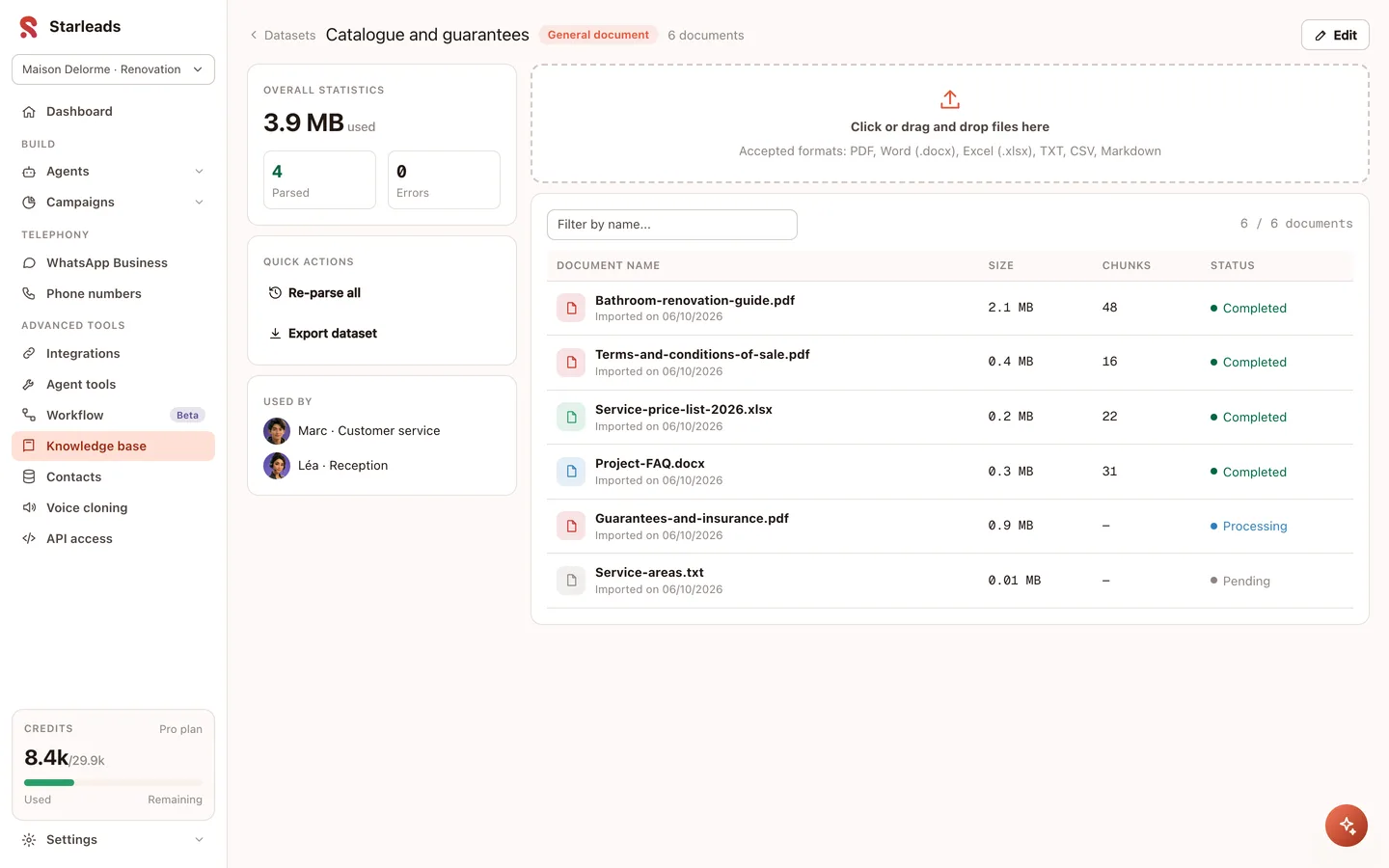
Transfer rules are written like a note to a new colleague. For example:
“If the customer mentions a refund or a damaged parcel, offer to put them through to an adviser. If no one is available, note their request and their number. If the answer isn’t in your documents, say so simply and take their details.”
Go over these rules with the person who picks up the requests. They know which cases come back to them, and in what form they want to receive them.
A software company might start with its website chat, then open the phone line. An online shop is more likely to start with order tracking, if that is the question that comes up most.
From Pro, what happens after the conversation can be automated too. A workflow (a chain of automatic actions) updates your CRM and sends the summary to the right person. Our agents have triggered more than 30,000 automatic actions in our customers’ tools after a conversation.
The detailed set-up, channel by channel, is on our AI customer service page.
Which mistakes damage the customer relationship?
A badly set-up agent can damage the trust your team has built. Three mistakes come up often.
- Leaving no way through to a person. A customer going round in circles ends up hanging up, or complaining elsewhere. Plan a transfer, a message or a callback.
- Letting answers go out of date. A condition changes, and the agent still answers with the old version. A price changes? You replace the file, and the agent follows. Make one named person responsible for this update.
- Passing the agent off as a person. Customers feel deceived as soon as they realise. Say upfront that it is an AI agent: with Starleads, you write this into the agent’s first message. For the rules that apply in the UK, see the official guidance from the ICO.
A fourth mistake is less visible: looking only at the volume handled. Also read the conversations that were transferred: they show what the agent can’t do yet.
In short
Hand over to AI the requests whose answer is written down: practical questions, order updates, appointments, first triage. Keep complaints, customers in difficulty and decisions for your team.
Start small, with your documents and a single channel, then extend to phone, chat and WhatsApp. AI customer service takes the recurring questions, at any hour. Your team can then focus on the customers who need it.