
“For sales, press 1. For order tracking, press 2.” Your customer listens to the end, doesn’t recognise their case and presses 9 at random. They wait, reach the wrong department and have to explain everything again.
An interactive voice response system does real work: it sorts calls without tying anyone up. But it is rarely judged from the other end of the line.
This guide starts from what your caller experiences. You will see how an IVR works, what it does well and what it costs. Then what changes with an AI voice agent, and a plan for moving from one to the other. One branch at a time, without changing your number.
What is interactive voice response (IVR)?
Interactive voice response (IVR) is an automated phone menu. It greets the caller, offers choices and routes the call according to the answer: a key pressed or a word spoken. You will also see it called an IVR system.
You will come across three terms for the same tool:
- IVR: the abbreviation, the most common term.
- Interactive voice response: the full name, often followed by “system”.
- Phone menu: what most callers call it.
An IVR is set up like a tree. Each key opens a branch. Each branch leads to a recorded message, a sub-menu or a queue. It can also follow your opening hours, and play a closing message in the evening.
An IVR doesn’t answer questions. It sorts, then passes the call to someone, or reads a message prepared in advance. That is where it differs from an AI voice agent.
How an IVR system works, and what it does well
An IVR receives the call before your team does. It plays a welcome message, then waits for the caller’s answer. Depending on the version, it understands two kinds of answer.
- Keypad presses: “press 1”, “press 2”. This is the most widespread form, and the most reliable.
- Keywords: the caller says “invoice” or “delivery”. The IVR recognises the word if it is on its list. It is often sold as a “smart” IVR.
Once the choice is made, the IVR routes the call. It sends it to an extension, a department, a queue or a message. It can also change the route depending on the time: to reception during the day, to voicemail in the evening.
Well set up, it does three things.
- It sorts a large volume of simple calls. When most requests fit into three or four categories, it shares them out without tying anyone up.
- It gives fixed information. Opening hours, address, lead times: a recorded message answers at any time of day.
- It takes pressure off your reception. Calls arrive already sorted, and each adviser gets the ones for their department.
For customer service with very repetitive requests, that is often enough. The limits appear when requests become more varied, or when the menu grows with every new case.
What your callers go through in a phone menu
From the company’s side, the IVR looks clear: every request has its key. From the caller’s side, the journey often looks like this.
They listen to the whole menu. They don’t know which option applies to them, so they wait for the end of the list. With a sub-menu, they listen to a second list. Some hang up before the end.
“People listen to the whole menu, then hang up.”
Their request isn’t in the menu. They want to change a delivery address and pay a balance. No key covers both. They choose “other enquiries”, the branch where everything ends up, with the longest queue.
The IVR doesn’t understand. The caller says “return” instead of “refund”. The system replies “Sorry, I didn’t understand your request” and sends them back to the start of the menu.
They call after closing time. The IVR plays its closing message, and the caller has to ring back tomorrow. On average, 27% of calls received come in outside opening hours.
They reach the wrong department. The adviser picks up knowing nothing about the call. The caller explains everything again, then waits for another transfer.
These moments weigh more at busy times. Inbound calls peak on Thursday between 10:00 and 11:00. At that hour, every misrouted call ties up an adviser and makes the next callers wait longer.
For your team, the cost shows too. Calls arrive without context, and the “other enquiries” branch becomes a second switchboard to run.
Keypad IVR, “smart” IVR or AI voice agent: side by side
Three tools now share the job of answering calls automatically. They differ mainly in what the caller can say, and in what they ask of your team.
| Keypad IVR | Keyword IVR (“smart”) | AI voice agent | |
|---|---|---|---|
| What the caller does | Presses a number | Says a word on the list | Explains the request in their own words |
| What the tool does | Routes the call or reads a message | Recognises the word, then routes the call | Answers from your documents, notes the request or transfers |
| Request outside the menu | “Other enquiries” branch | “Sorry, I didn’t understand”, back to the menu | Asks a question to clarify, or hands over |
| Updates | Change the tree and re-record the messages | Change the tree and the word list | Change its instructions and its documents |
| Upkeep | Each new branch has to be configured | Each new word has to be configured and tested | No tree to reconfigure: you edit a text |
| What it asks of your team | Picking up every misrouted call | Picking up every misunderstood call | Taking transferred calls, with their summary |
The IVR keeps one advantage: it is predictable. A key leads to the same place every time. To sort three departments and announce your opening hours, it does the job very well.
An AI voice agent becomes useful when requests get mixed. The caller says “I’d like to move my Tuesday delivery”, and the agent understands the need. It answers within your instructions, and transfers to the right adviser when the request calls for it.
- The callerThey listen to the whole menuThey don’t know which option applies to them, so they wait for the end.
- IVR menuTheir request isn’t coveredNo key fits their case: they choose “other enquiries”.
- QueueThe longest queueThe branch where everything ends up, and where the wait grows at busy times.
- Your teamAn adviser picks up without contextThe caller explains everything again, then waits for another transfer.
- The callerThey explain in their own words“I’d like to move my Tuesday delivery.”
- Léa · PhoneLéa understands the needShe answers from your documents, or asks a question to clarify.
- Your instructionsShe transfers when neededTo the right adviser, when the request calls for it.
- Your teamThe adviser gets a call already understoodThe transferred call arrives with its summary.
of inbound calls answered by the AI agent, on average
How much does an IVR cost?
The price of an IVR varies a lot from one offer to another. Rather than an average price, look at what drives it, so that you compare like-for-like quotes.
- The subscription or licence: charged per line, per extension, per simultaneous call or per minute.
- The number of branches and queues: a three-option tree takes less work than a twenty-branch tree.
- Recorded messages: a synthetic voice or a voice recorded in a studio, to redo with every change.
- Options: keyword recognition, statistics, a link with your CRM.
- Configuration: the initial set-up, then each change, if it goes through a provider.
This last item is often forgotten. A new department, summer opening hours or a change of offer: each time, the tree needs reworking.
For an AI voice agent, the calculation is different: the subscription includes credits, used on each call. At Starleads, the Starter plan costs €79 excl. VAT a month with a 12-month commitment.
It includes 118,800 credits a year (1 credit = €0.01 excl. VAT). An inbound call uses 28 credits with the 12-month commitment, or 36 with no commitment, whatever its length. You can try it free for 7 days first, with no limits.
Moving from an IVR to an AI voice agent, step by step
Nothing forces you to change everything at once. The safest way is to move one branch at a time, and keep your IVR in place.
- Choose the branch that blocks callers most. It is often “other enquiries”, the longest queue or the evening branch. Look at where callers hang up and where transfers pile up.
- Send those calls to the agent. In your IVR, set that branch to forward the call to your agent. The others don’t change. You can also forward calls from your number on overflow, when no one picks up.
- Tell it how to answer. Write its instructions in plain language: its first message, what it notes, when it transfers and to whom. Give it your documents: prices, opening hours, frequently asked questions.
- Test before you open. Simulate conversations with the frequent requests of that branch. Then with the ones that cause you problems today.
- Keep the IVR as a fallback. The other branches keep working as before. To go back, you restore the branch’s original setting.
- Track the transfers. Each conversation comes with its transcript, a summary and a classification by topic. The dashboard shows the transfers. You see what the agent handles on its own, and what it passes to your team.
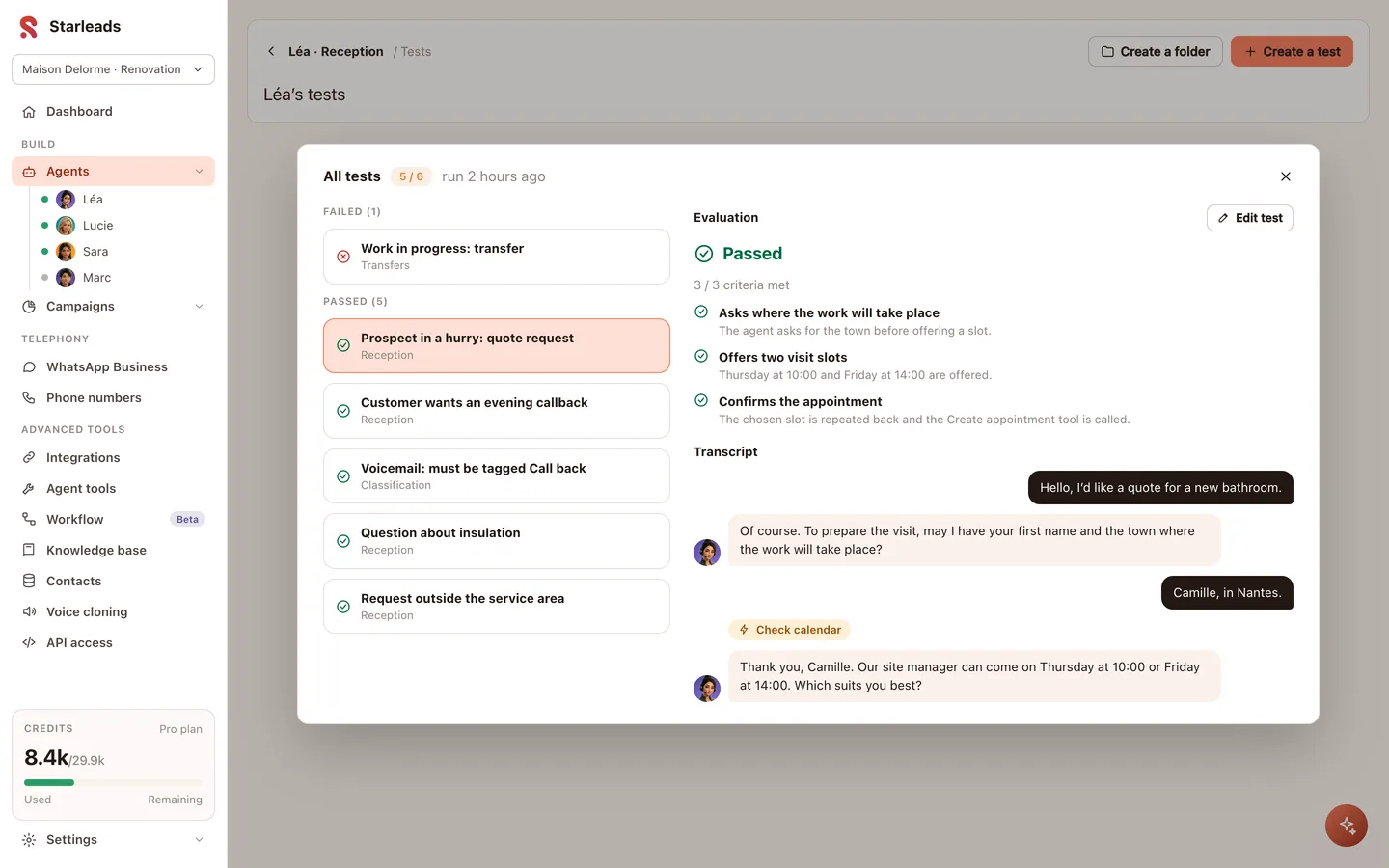
Your number doesn’t change. There are two ways to bring your calls to Léa, your AI agent:
- call forwarding from your current number, permanent or on overflow, from Starter;
- your SIP line (internet telephony) or your extensions, connected to Starleads, from Pro.
Your phone system stays in place. With call forwarding, your subscription and your IVR stay with your provider. The connection options depend on your set-up.
When the first branch is running well, move on to the next. For a complete reception service, with transfers and message-taking, see our AI receptionist page.
In short
An interactive voice response system sorts simple calls well and announces your fixed information. It gets stuck when the request falls outside the menu, and it is your caller who pays for the lost time.
An AI voice agent understands the request as it is said, then answers or transfers according to your instructions. Start with one branch, keep the rest of the menu as a fallback, and track the transfers. Your team then receives calls that are already understood, and can focus on the ones that need it.